
What Is Gray Code?
Gray code is a binary numbering system in which consecutive values differ by only one bit. The most common form is binary reflected Gray code, which is widely used when changing between adjacent states should produce as few bit transitions as possible.
Ordinary binary counting does not always behave this way. For example, moving from decimal 3 to decimal 4 changes binary 011 to 100. All three bits change. In a reflected Gray code sequence, the corresponding values are 010 and 110, which differ in just one position.
This property makes Gray code useful in applications such as position encoders and digital systems where several signal transitions happening at different times could produce an incorrect intermediate reading.
Gray code does not replace ordinary binary arithmetic. Its main advantage is the relationship between adjacent code words.
How to Convert Binary to Gray Code
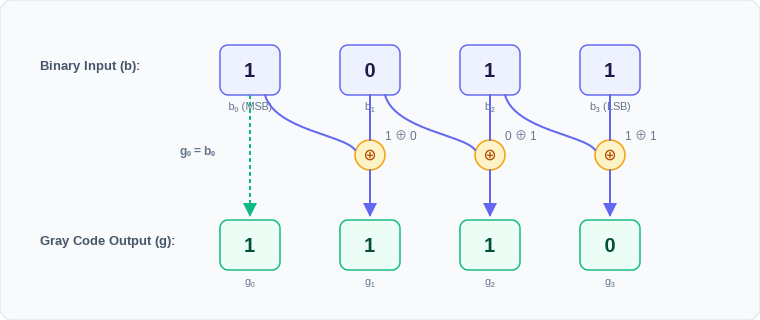
Converting binary to Gray code requires only XOR operations between neighboring binary bits.
The first bit remains unchanged. For each remaining position, compare the current binary bit with the bit immediately to its left.
The XOR rule is simple: equal bits produce 0, and different bits produce 1.
Worked Example: Convert Binary 1011 to Gray Code
Input: 1011
First bit: 1 → 1
Remaining positions:
- 1 XOR 0 = 1
- 0 XOR 1 = 1
- 1 XOR 1 = 0
The result has the same number of bits as the input.
How to Convert Gray Code to Binary
Gray-to-binary conversion uses a related process, but there is an important difference.
The first binary bit is copied directly from the first Gray bit. Every following binary bit is calculated by XORing the current Gray bit with the previously decoded binary bit.
This means the conversion proceeds from left to right.
Worked Example: Convert Gray 1110 to Binary
Gray input: 1110
First binary bit: 1
Then:
- 1 XOR 1 = 0
- 0 XOR 1 = 1
- 1 XOR 0 = 1
Notice that the second operation uses the binary bit obtained in the previous step, not the previous Gray bit. Mixing these two methods is a common decoding mistake.
Binary vs Gray Code
Both binary and Gray code represent combinations of bits, but their sequences are organized differently.
| Property | Ordinary Binary | Reflected Gray Code |
|---|---|---|
| Consecutive values | May change several bits | Exactly one bit changes |
| Standard arithmetic | Directly supported | Conversion is usually needed |
| Typical purpose | Number representation | Adjacent-state representation |
| Example sequence | 000, 001, 010, 011 | 000, 001, 011, 010 |
Gray code is especially useful when the order of adjacent states matters more than directly performing arithmetic on the encoded values.
3-Bit Gray Code Conversion Table
Use this verified reference table for 3-bit binary reflected Gray code:
| Decimal | Binary | Gray Code |
|---|---|---|
| 0 | 000 | 000 |
| 1 | 001 | 001 |
| 2 | 010 | 011 |
| 3 | 011 | 010 |
| 4 | 100 | 110 |
| 5 | 101 | 111 |
| 6 | 110 | 101 |
| 7 | 111 | 100 |
Each consecutive entry in the Gray code column changes one bit, including the final-to-first transition for the complete reflected 3-bit cycle.
Where Is Gray Code Used?
Rotary encoders
Some rotary encoders use Gray code so that adjacent positions differ in only one bit. This reduces the chance of reading a large, incorrect jump caused by multiple bits changing at slightly different times.
Asynchronous systems
Gray-coded counters are useful in some clock-domain crossing designs because only one counter bit changes between neighboring values. Additional synchronization is still necessary.
Digital logic education
Gray code also explains why Karnaugh map rows and columns are arranged in Gray-code order. Neighboring cells differ by one variable, allowing adjacent minterms to be grouped for Boolean simplification. Check out our free interactive Karnaugh Map Solver to see Gray-code adjacency used in visual grouping and minimization.
Common Gray Code Conversion Mistakes
Using ordinary binary order for Gray-code columns: Gray-code sequences such as 00, 01, 11, 10 should not be rearranged into normal binary order when constructing a Karnaugh map.
XORing the wrong bits during decoding: Gray-to-binary conversion uses the previously decoded binary bit, not the neighboring Gray bit.
Dropping leading zeros: Leading zeros matter when the output must represent a fixed-width digital word.
Assuming Gray code supports ordinary arithmetic directly: Gray code is an encoding. For normal arithmetic, convert to binary first.
Frequently Asked Questions
What is the difference between binary and Gray code?
Ordinary binary is used for representing numbers and performing arithmetic. Reflected Gray code arranges successive values so that only one bit changes between neighbors.
Can Gray code be converted back to binary?
Yes. Copy the first bit, then decode each following binary bit using XOR with the previous decoded binary bit.
Why is Gray code used in Karnaugh maps?
Gray-code ordering ensures horizontally or vertically adjacent cells differ in only one variable, enabling visual grouping of minterms.
Do leading zeros matter?
They matter when a fixed bit width is being used. For example, 0011 and 11 represent the same unsigned numeric value but are different-width bit strings.
Related Educational Tools
Explore companion calculators and converters for digital logic design, computer architecture, and number systems.
Karnaugh Map Solver
Simplify 2–5 variable Boolean logic functions with step-by-step visual K-Maps, SOP/POS forms, and circuit diagrams.
Number System Converter
Convert integers between binary, octal, decimal, and hexadecimal using positional place values and repeated division.
IEEE 754 Floating-Point Converter
Explore 32-bit single and 64-bit double precision representations with sign, exponent, and fraction bit fields.